Placing a bet, step by step
Log in
Bets are tied to your account balance. If you don't have an account yet, start with registration.
Open the sportsbook
Choose Sports for upcoming events or Live for matches already in progress.
Select a sport
Football, basketball, tennis and the rest are listed in the sport menu.
Select a competition
Events are grouped by country and league or tournament.
Open the event
The event page shows every market for that match.
Choose a market
For example the match result, total goals or a handicap.
Select the odds
The outcome is added to your bet slip, and the slip counter updates.
Review the stake
Enter an amount. The slip shows the potential return before anything is placed.
Confirm the bet
If the bet is accepted, the slip shows a confirmation and the stake leaves your balance.
Track the bet
The bet appears in your bet history with its status until the event is settled.
Inside the bet slip
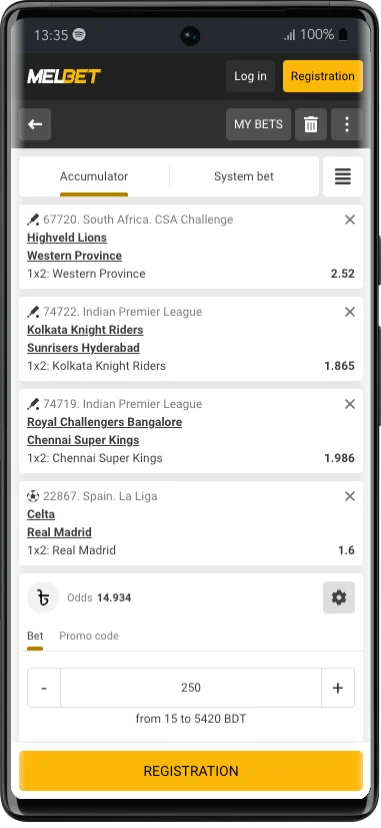
The bet slip collects every outcome you've selected. For each one it shows the event, the market, the outcome and the current odds. Below that you set the bet type and the stake, and the slip calculates the potential return.
If you add a selection by mistake, remove it with the cross next to it. Clearing the slip removes everything. Nothing is placed until you confirm, so a full slip costs nothing until then.
Some selections can't be combined. Two outcomes from the same match are a common example. The slip tells you when that happens and offers the bet types that still work.
Bet types
The slip offers the bet types that fit your selections. These three are standard across sportsbooks:
| Bet type | How it works | Settles as a win when |
|---|---|---|
| Single | One selection, one stake. | That selection wins. |
| Accumulator | Two or more selections from different events combined. The odds multiply together. | Every selection wins. One loser loses the bet. |
| System | Several accumulators built from your selections, for example every double from three picks. Each combination is a separate stake. | Enough combinations win to pay back more than the total staked. Partial returns are possible. |
Accumulator example: three selections at 1.50, 1.80 and 2.00 combine to odds of 5.40. A stake of 100 returns 540 if all three win, and nothing if one loses.
When the odds change before you confirm
Odds move all the time, especially in live markets. If an outcome's odds change while it sits in your slip, the slip shows the new price and asks you to accept it before the bet can be placed.
If the slip offers an odds-change setting, it typically lets you accept any change, accept only increases, or approve each change yourself. Approving each change is the safest choice while you're learning.
What each bet status means
Your bet history shows a status for every bet. The exact labels in your account may vary slightly.
| Status | What it means |
|---|---|
| Accepted / open | The bet is placed and waiting for the event to finish. |
| Won | The bet won. The return has been added to your balance. |
| Lost | The bet didn't win. The stake isn't returned. |
| Returned / void | The stake is refunded, for example if a match is cancelled or a selection is voided under the sport's rules. In an accumulator, a voided selection is usually removed and the remaining odds still stand. |
| Cancelled | The bet was cancelled, for example because of an obvious pricing error. The stake goes back to your balance. |
When a bet isn't accepted
The slip always tells you why. These are the usual messages and what to do about each one.
"Odds have changed"
Review the new odds in the slip and confirm again, or change the odds-change setting.
"Market suspended"
The market is paused, usually because something just happened in a live match. Wait a few seconds and try again, or pick another market.
"Insufficient funds"
The stake is higher than your available balance. Lower the stake or make a deposit.
Stake above the maximum
Each market has a maximum stake. The slip shows the limit; reduce the stake to fit.
Selections can't be combined
Remove the related selections or place them as separate singles.
Frequently asked questions
How do I place a bet on Melbet?
Log in, open an event, select the odds for an outcome, enter a stake in the bet slip and confirm. The bet then appears in your bet history.
What is an accumulator?
A single bet combining selections from different events. The odds are multiplied together, and every selection has to win.
Why does my bet say pending?
The event hasn't finished or hasn't been settled yet. Bets settle once the official result is confirmed.
Can I cancel a bet after confirming it?
Generally no. Once a bet is accepted it stands. Check the slip carefully before confirming.
Why was my stake returned?
The bet or one of its selections was voided, for example because the event was cancelled or postponed. The sport's rules set how it settles.