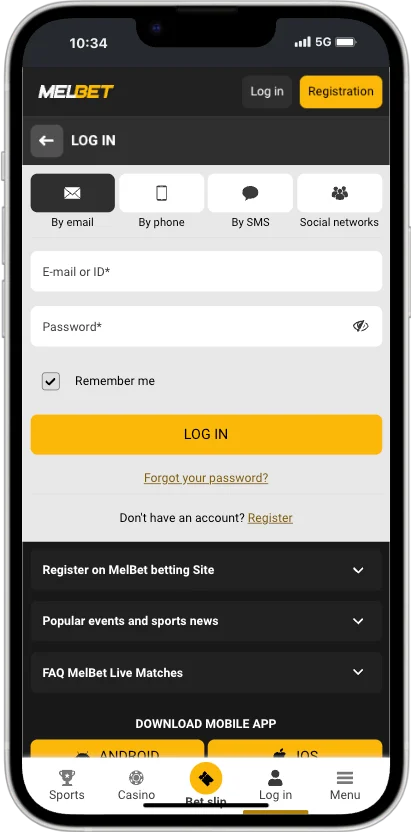
Melbet's login screen has three tabs (By email / ID, By phone and By code), plus social network buttons at the bottom. Which one you use depends on how you registered. Here's how each one works, how to get back in if you've forgotten your password, and how to avoid fake login pages.
Ways to log in: three tabs and social networks
Each tab gets you into the same account. Use the details you registered with:
By email / ID
Enter your e-mail address or your Melbet account ID in the E-mail or ID field, then your password, and press Log in.
Your account ID is the number Melbet gave you when you registered. If you used One-click, it's the ID shown on screen at sign-up. Once you're logged in, it's also in My Account.
By phone
The +251 code is filled in. Type your number without the leading 0 (91 123 4567, not 0911 234 567), enter your password and press Log in.
By code
No password needed. Enter your phone number, keep SMS as the method and press Send via SMS. Type in the code you receive and you're logged in.
Handy if you've forgotten your password but still have your phone. It's also the safest option on a shared device, because nothing is saved.
Social networks
Below the form, under You can log in to your account via, are buttons for social accounts. Use the one you registered with, or one you've linked in your profile.
The login screen with its tabs
How to log in to Melbet
Go to melbet.et
Type the address yourself or use a bookmark. Don't follow links from messages.
Press LOG IN
It's at the top right of every page on the website and on the app's start screen.
Pick your tab
By email / ID, By phone or By code.
Enter your details
Your password, or the SMS code if you're using By code.
Decide on Remember
Tick Remember only on your own phone or computer.
Check you're in
Your balance in ETB appears in the header once you're signed in.
Logging in on each device
It's the same account and the same details everywhere. Only the screen changes.
Device
How
Tip
Desktop
melbet.et in any current browser
On a shared computer, use By code and leave Remember unticked.
Mobile browser
melbet.et in Chrome, Safari or another browser
Add the site to your Home Screen for one-tap access.
It's under the password field on the By email / ID and By phone tabs.
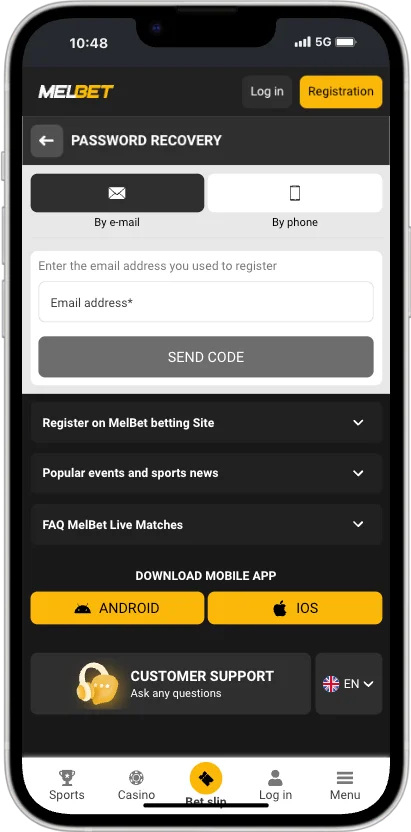
Enter your phone or e-mail
Use the one connected to your account.
Enter the code or open the link
A reset code or link is sent to that phone or e-mail.
Set a new password
Choose one you haven't used before, then sign in with it.
In a hurry? The By code tab gets you in with just an SMS, so you can reset the password afterwards in your security settings. If you no longer have the phone or e-mail on the account, contact support, who will verify your identity before restoring access.
Password recovery: choose e-mail or phone, then send the code
Common login problems
"Incorrect login or password"
Check you're on the right tab. An account ID won't work on the By phone tab. Also check Caps Lock, and that the phone number has no leading 0. After a few failed tries, reset the password rather than guessing.
I registered with One-click and lost my ID
If you added a phone number, use By code. If not, contact support.
The SMS code doesn't arrive
Wait a minute and request it again. Check signal, and that the number is the one on your account.
The page won't load
Check your connection, then try another browser or switch between mobile data and Wi-Fi. Clearing the browser cache fixes many loading problems.
Logged out straight after signing in
Your browser is probably blocking cookies for the site. Allow cookies for melbet.et, or turn off private browsing.
The app shows an error but the website works
Update the app to the latest version. See the APK guide.
Logging in safely
Fake login pages are the most common way betting accounts get taken over.
Check the address bar shows melbet.et before you type anything.
Melbet will never ask for your password or SMS code over chat, phone or social media.
Don't sign in through links in SMS, WhatsApp or Telegram messages offering bonuses.
Untick Remember and log out on shared or public devices.
Use a password you don't use for e-mail or other accounts.