Opening a Melbet account takes about two minutes. The form has four tabs (By phone, One-click, By e-mail and Socials), and before you fill any of them in it asks you to choose a welcome bonus. Here's what each tab asks for, which one we'd pick in Ethiopia, and the details worth getting right so your bonus and first withdrawal aren't held up later.
Before you register
You need to be at least 18 and allowed to take part in online betting where you live. Have your phone nearby: on the phone tab a confirmation code is sent by SMS, and an activated phone number is required for the welcome bonus whichever tab you use.
Keep to one account per person. Duplicate accounts aren't allowed under Melbet's terms and can be closed, together with any bonuses on them.
Step one on every tab: choose a welcome bonus
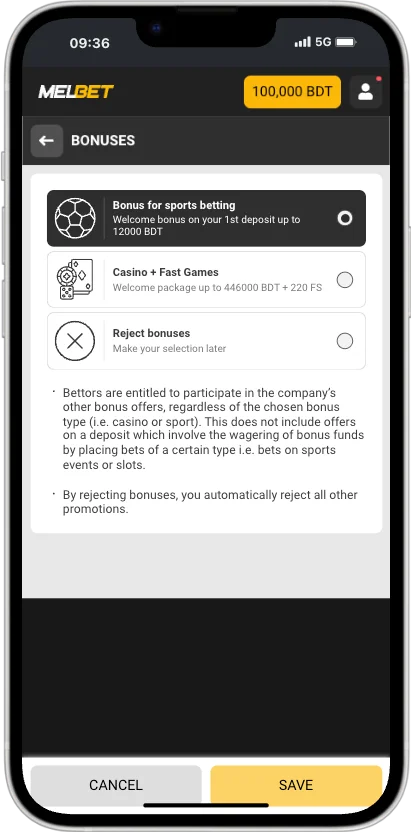
At the top of the registration form, above the sign-up fields, Melbet asks which welcome offer you want. The amounts are shown in your selected currency.
Option on the form
What you get
Choose it if
Bonus for sports
200% first deposit bonus up to 37,000 ETB, wagered 8x in accumulators. Full terms
You mainly bet on football and other sports.
CASINO + Games
A casino welcome package with free spins. The amount in birr is shown on the form.
You mainly play slots, live casino or Fast Games.
Reject bonuses
No welcome bonus. Your deposit is plain money with no wagering.
You want to be able to withdraw your deposit without any wagering.
Make your choice later
No decision yet. You can pick a bonus in My Account before your first deposit.
You're not sure yet. Just remember to decide before you deposit.
You can only get one welcome bonus, and it's tied to your first deposit, so choose before you pay. On the international site we checked, the casino package came with 290 free spins, but go by the figure on your form.
The bonus choice: sports, casino + fast games, or no bonus
The four ways to register
The tabs sit at the top of the form. They all create the same Melbet account. What differs is which details you enter now and which you add later.
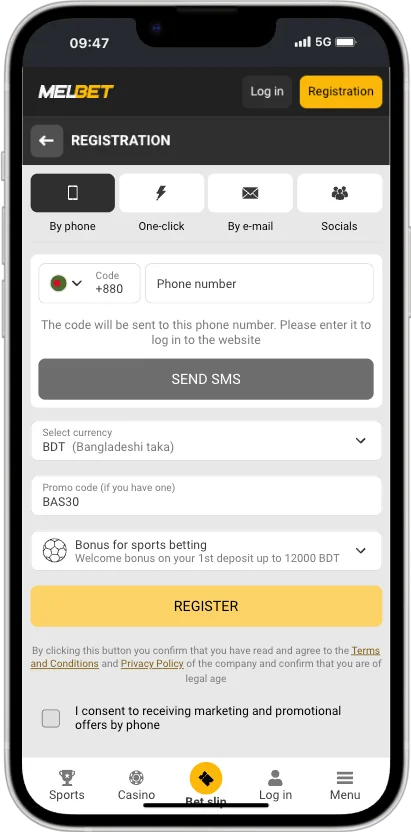
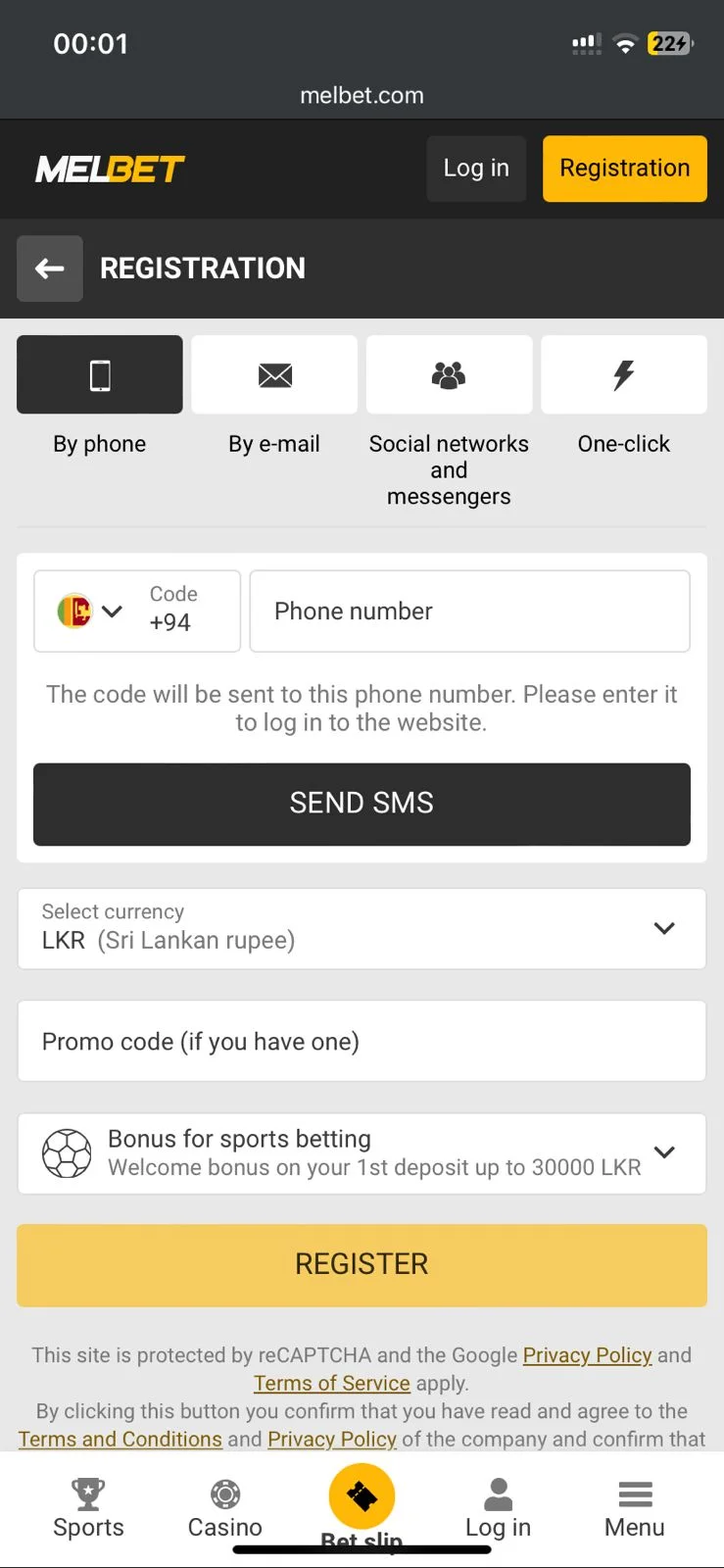
You enter your mobile number after the +251 country code and choose SMS as the sending method. Then you tap Send via SMS, select your currency, type in the confirmation code and confirm. Add a promo code if you have one, then press Register.
Our pick for Ethiopia. Your number is confirmed at the same time as you register, and an activated phone is one of the conditions for the welcome bonus.
One-click
The quickest tab. You select your country (Ethiopia) and currency (Ethiopian birr), add a promo code if you have one, and press Register. Melbet creates the account straight away and shows you an account ID and password.
Save those details before you close the window, ideally by screenshot. Then add your name, e-mail and phone number in My Account. The welcome bonus needs them.
By e-mail
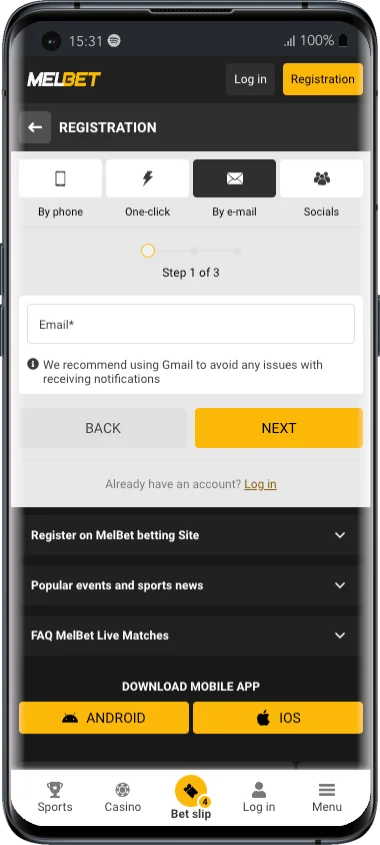
The most complete tab. You select country and currency, enter your e-mail and tap Send code, then type the confirmation code and confirm. After that you add your phone number, choose a password, enter it a second time and press Register.
Good if you'd rather log in with an e-mail address, and your e-mail is confirmed from the start.
Socials
Sign up with one of the social networks shown on the tab, then select country and currency, add any promo code and press Register. You'll then log in with the same social account. Complete your phone and e-mail in My Account afterwards.
By phone: number, SMS code, currency and bonusBy e-mail: a three-step form starting with your e-mail
Registering by phone, step by step
Open Registration
Press REGISTRATION at the top of melbet.et or in the app. The form opens on the By phone tab.
Choose your welcome bonus
Bonus for sports, CASINO + Games, Reject bonuses or Make your choice later. See the table above.
Enter your phone number
The +251 code is already filled in. Type the rest of your number without the leading 0: 0911 234 567 becomes 91 123 4567.
Choose SMS and press Send via SMS
SMS is the sending method. The code arrives within a minute or so.
Select your currency
Choose Ethiopian birr (ETB). It can't be changed later, and paying in birr avoids conversion on TeleBirr, CBEbirr and bank deposits.
Enter the confirmation code and press Confirm
Type the code from the SMS exactly as received.
Add a promo code (optional)
The field is labelled Promo code (if you have one). Codes can't be added after registration.
Press Register
This confirms you've read the Terms and Conditions and Privacy Policy and that you're of legal age. Ticking the box for marketing offers by phone is optional.
Your account is ready. Already have one? Log in instead.
The By phone tab: enter your number, then tap Send SMS
What each tab asks for
"Later" means you add it in My Account after registering. For the welcome bonus, everything has to be filled in and your phone activated before your first deposit.
Field
By phone
One-click
By e-mail
Socials
Welcome bonus choice
Yes
Yes
Yes
Yes
Country
Set by +251
Ethiopia
Ethiopia
Ethiopia
Currency
ETB
ETB
ETB
ETB
Phone number
Yes, confirmed by SMS
Later
Yes
Later
E-mail
Later
Later
Yes, confirmed by code
Later
Password
Later
Generated for you
You choose it
Social account
Promo code
Optional
Optional
Optional
Optional
Getting your details right in Ethiopia
Verification compares what you entered with your documents. These details trip people up most often:
Phone: +251 followed by 9 digits without the leading zero. Ethio telecom numbers start with 9 and Safaricom Ethiopia numbers with 7. Use a SIM you'll keep, because password resets and login codes go to it.
Name: Ethiopian names are a given name followed by the father's and grandfather's names, not a family surname. Enter yours in the same order and spelling as on the ID you'll verify with.
Date of birth: the profile uses the Gregorian calendar. If your documents show an Ethiopian-calendar date, convert it carefully. Ethiopian years run about seven to eight years behind, and the new year falls in September.
Currency: Ethiopian birr (ETB), so your balance, bonuses and limits are all shown in birr.
Password: one you don't use anywhere else.
After registering: get ready for the bonus and withdrawals
Complete your profile
In My Account, fill in your full name, mobile phone number (activated), e-mail address and country of residence. The welcome bonus is only credited when all four are complete.
Check your bonus choice
If you picked Make your choice later, opt in to the bonus in your profile now. It can't be added after the deposit. See the first deposit bonus.
Make your first deposit
From 185 ETB with TeleBirr, CBEbirr, M-Pesa, a bank or crypto. See how to deposit.
Verify your identity early
It's required before your first withdrawal, so doing it now avoids a wait later. See verification.
Registration problems
No SMS code arrives
Check you typed the number without the leading 0 after +251. Wait a minute, then request a new code. Make sure your phone has signal and isn't blocking SMS from unknown senders.
"Phone number already registered"
An account already exists with that number, possibly your own from earlier. Log in or reset the password instead of opening another account.
I lost my one-click ID and password
Use Forgot your password? on the login screen if you added a phone or e-mail. If not, contact support.
The welcome bonus wasn't credited
Usually the profile was incomplete (name, activated phone, e-mail, country) or bonuses weren't opted in to before the deposit.
I entered my details wrongly
Don't open a second account. Contact support with your ID so the details can be corrected.
Frequently asked questions
How do I register on Melbet in Ethiopia?
Press Registration, choose a welcome bonus, pick a tab (By phone, One-click, By e-mail or Socials), select Ethiopian birr as your currency and press Register. Registering by phone with your +251 number is the quickest way to an account that's ready for the bonus.
What is Melbet one-click registration?
A tab that creates an account from just your country and currency. Melbet shows you an account ID and password. Save them, then complete your profile in My Account.
Which welcome bonus should I choose?
Bonus for sports (200% up to 37,000 ETB) if you mainly bet on sports. CASINO + Games if you mainly play the casino. Reject bonuses if you'd rather have no wagering on your deposit.
Where do I enter a Melbet promo code?
In the "Promo code (if you have one)" field on the registration form, before you press Register.
Which currency should I choose?
Ethiopian birr (ETB). The currency can't be changed after registration.
I didn't get the SMS code. What should I do?
Check the number was entered after +251 without the leading 0, wait a minute and request a new code. If it still doesn't arrive, contact support.